Crafting Timeless Romance: A Comprehensive Guide to Papercut Wedding 3D Shadow Box Love Designs
The intersection of traditional craftsmanship and modern digital fabrication has given rise to some of the most poignant keepsakes in contemporary wedding culture. Among these, the Papercut Wedding 3D Shadow Box Love design stands out as a versatile medium for expressing affection, commemorating special dates, and creating stunning home decor. This art form combines the delicate intricacy of paper cutting with the depth and dimensionality of shadow boxing, resulting in a piece that captures light, shadow, and emotion in equal measure. Whether utilized as a centerpiece for the reception, a heartfelt gift for the couple, or a lasting decoration for the marital home, these designs offer a unique blend of personalization and artistic flair.
Understanding the full potential of a Papercut Wedding 3D Shadow Box Love project requires more than just access to a cutting machine; it demands an appreciation for material science, layering techniques, and file compatibility. As digital cut files become increasingly sophisticated, creators ranging from hobbyists to professional signage makers are finding new ways to leverage these assets. The following guide explores the practical applications, material considerations, and technical workflows necessary to bring these intricate designs to life.
Material Selection and Structural Integrity
The foundation of any successful shadow box project lies in the choice of materials. While the digital file provides the blueprint, the physical medium determines the final aesthetic and durability. For those aiming to create a Papercut Wedding 3D Shadow Box Love display, the options are vast, yet each material brings specific challenges and advantages.
Cardstock remains the most popular choice for purists who value the classic look of layered paper. A weight of 65lb is often recommended as the sweet spot; it is heavy enough to hold its shape without warping under the tension of intricate cuts, yet flexible enough to adhere smoothly to adhesive layers. However, working with cardstock requires vigilance regarding the cutting mat. If the mat has lost its tackiness, the cardstock may lift during the cutting process, leading to tears that ruin the delicate details of the design. Ensuring your mat is clean and sufficiently sticky is a critical, often overlooked step in the workflow.
For creators seeking a more robust, architectural feel, wood, plywood, and MDF offer exceptional durability. These materials transform the shadow box from a fragile paper craft into a substantial piece of wall art capable of withstanding the test of time. When using wood or MDF, the "intricate settings" on your cutting software must be adjusted to account for the density of the material. Similarly, acrylic provides a modern, translucent quality that interacts beautifully with light, creating glowing effects when backlit. Regardless of the material chosen, the principle remains the same: the material must be compatible with the level of detail inherent in the Papercut Wedding 3D Shadow Box Love file.
Navigating File Formats and Software Compatibility
In the realm of digital crafting, the utility of a design is dictated by its file format compatibility. A comprehensive cut file set for a wedding shadow box typically includes a variety of formats to ensure accessibility across different platforms and user skill levels. Understanding which format serves your specific workflow is essential for efficiency.
- SVG (Scalable Vector Graphics): This is the gold standard for users of Silhouette Studio Designer Edition, Cricut Design Space, Make the Cut, and Sure Cuts A Lot. SVG files retain vector data, allowing for infinite scaling without loss of quality. They are ideal for maintaining the crisp lines required in complex layered designs.
- DXF (Drawing Exchange Format): Often included for users operating on the free version of Silhouette Studio (Basic Edition). While slightly less robust than SVG in terms of preserving certain grouping attributes, DXF files are universally accepted and reliable for basic cutting tasks.
- EPS (Encapsulated PostScript): The preferred format for professional graphic designers using Adobe Illustrator, Corel Draw, or Inkscape. EPS files allow for advanced manipulation of vectors, making them suitable for those who intend to modify the original Papercut Wedding 3D Shadow Box Love design before cutting.
- PNG (Portable Network Graphics): While not a cut file, high-resolution PNGs are invaluable for printing purposes, previewing layers, or using with software that does not support vector imports. They are also crucial for visualizing color schemes before committing to physical materials.
It is important to note that while these files are designed for precision, the end-user must configure their machine settings correctly. Intricate settings custom for layers with a lot of detail are necessary to ensure that fine bridges and small connections within the design are not severed accidentally. This is particularly true when working with dense materials like wood or thick cardstock.
Customization and Color Theory
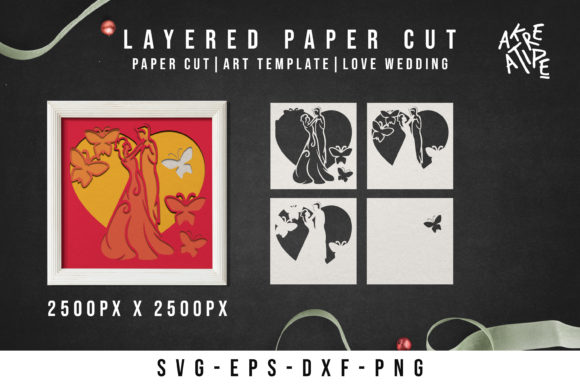
One of the most compelling aspects of the Papercut Wedding 3D Shadow Box Love concept is its adaptability. The colors displayed on a screen during the purchasing or downloading phase are merely examples, serving as a visual guide rather than a restriction. This flexibility allows creators to tailor the piece to specific wedding themes, seasonal palettes, or interior design requirements.
For a rustic wedding, one might choose natural wood tones paired with sage green cardstock. Conversely, a modern, minimalist celebration might call for stark white layers against a black background to maximize contrast. The ability to change colors according to preference empowers the creator to infuse personal meaning into the object. Furthermore, this customization extends to the arrangement of layers. By altering the spacing between layers or the depth of the shadow box frame, the perception of depth can be manipulated to create a more dramatic three-dimensional effect.
Advanced Techniques: Iron-On Transfers and Hybrid Applications
Beyond the traditional shadow box assembly, the digital files associated with Papercut Wedding 3D Shadow Box Love designs can be adapted for other creative applications, such as iron-on transfers for textiles. This opens up possibilities for creating matching table runners, tote bags, or even bridal party t-shirts that echo the main decor.
When utilizing these files for heat transfer vinyl (HTV) or printable transfer paper, a critical technical step must not be ignored: mirroring the image. Users must click the "flip horizontal" button in their design software before finalizing the print or cut job. Failure to do so will result in reversed text or asymmetrical elements that appear incorrect once applied to the fabric. Additionally, it is imperative to follow the specific temperature and pressure directions provided by the transfer paper manufacturer, as different materials react differently to heat. This attention to detail ensures that the integrity of the design is maintained across various mediums.
Workflow Optimization for Professionals and Educators
For business owners and educators teaching digital fabrication, the Papercut Wedding 3D Shadow Box Love file set represents a valuable resource. The inclusion of multiple file formats in a single zipped folder streamlines the distribution process, ensuring that students or clients regardless of their equipment can access the design.
Professionals producing these items for sale should consider establishing a standardized workflow. This begins with verifying the file integrity upon download, followed by a test cut on scrap material to dial in machine settings. Because these designs often feature significant detail, a test cut prevents waste of expensive materials like acrylic or specialty wood. Once the settings are optimized, batch production can commence. For educators, these projects serve as excellent case studies for teaching vector manipulation, material properties, and the physics of light and shadow in a tangible, engaging way.
Troubleshooting and Support
Even with high-quality files and premium materials, challenges can arise. Issues such as weeding difficulties, incomplete cuts, or alignment errors during assembly are common hurdles. It is vital for creators to remember that technical support is often available. If you encounter difficulties with the file or need clarification on layer ordering, reaching out to the designer is a prudent step. Many creators are happy to help troubleshoot specific issues, ensuring that the final product meets the high standards expected of a wedding keepsake.
In conclusion, the Papercut Wedding 3D Shadow Box Love design is more than a simple cut file; it is a catalyst for creativity. By understanding the nuances of material selection, mastering the technical requirements of various file formats, and embracing the potential for customization, creators can produce breathtaking works of art. Whether for personal enjoyment, educational purposes, or commercial enterprise, these shadow boxes offer a timeless way to celebrate love through the precise and beautiful medium of layered design.