Elevating Editorial Presentations with Magazine with Environment 3D Mockup
In the competitive landscape of graphic design and branding, the difference between a concept that gets approved and one that gets rejected often lies in presentation. Clients and stakeholders rarely possess the spatial imagination to visualize a flat digital file as a tangible product. This is where the Magazine with Environment 3D Mockup serves as a critical bridge between abstract design and physical reality. Unlike standard isolated mockups that float a publication in a white void, this specific resource places editorial work within curated lifestyle interiors, providing immediate context and emotional resonance.
For designers, art directors, and brand managers evaluating tools for their next pitch or portfolio update, understanding the nuances of environmental mockups is essential. This article explores what makes this particular asset distinct, how it compares to other visualization methods, and the specific scenarios where it offers the highest return on investment versus when a simpler approach might suffice.
The Distinct Value of Contextual Presentation
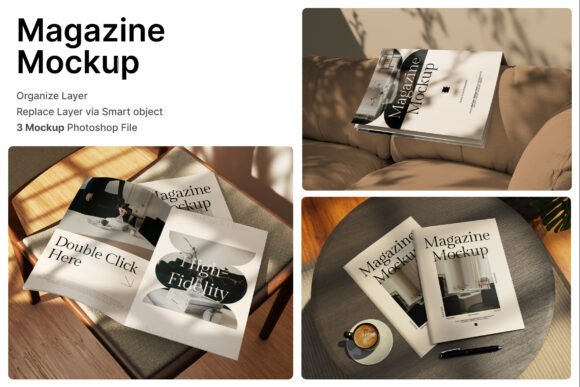
The primary differentiator of the Magazine with Environment 3D Mockup is its commitment to storytelling through setting. Traditional mockups often focus solely on the object—the magazine itself—rendered with high fidelity but devoid of surroundings. While useful for technical specifications, they fail to convey the lifestyle associated with the brand. In contrast, this resource integrates the publication into natural tabletop scenes, cozy sofa arrangements, and immersive interior compositions.
When you utilize these scenes, you are not just showing a cover; you are suggesting a reading experience. A fashion magazine placed on a minimalist marble table implies luxury and exclusivity. An architecture journal resting on a textured wooden desk suggests depth and study. These environmental cues trigger psychological associations in the viewer, helping them understand not just what the magazine looks like, but who it is for and where it belongs in their life. The inclusion of both opened and closed views further enhances this by allowing designers to showcase interior layouts, typography, and image treatment alongside the cover art.
Technical Specifications and Workflow Efficiency
Beyond the aesthetic advantages, the practical utility of this tool is defined by its technical architecture. The package typically includes three distinct PSD files, offering variety without the need to purchase multiple assets. For professionals working under tight deadlines, the workflow efficiency is a significant factor. The use of Smart Object layers streamlines the process: users simply double-click the designated layer, paste their design, save, and the mockup automatically applies perspective, lighting, and shadows.
The resolution is another critical metric for evaluation. With dimensions of 4000 x 3000 pixels at 300 DPI, the output is print-ready. This distinguishes it from lower-resolution web-only mockups that may pixelate when used in high-stakes presentations or printed lookbooks. However, it is important to note a common limitation in this category: the stock images used to create the environment are generally not included for separate commercial use. The value lies strictly in the mockup template itself, not the background photography. Designers must ensure their final composition respects these licensing boundaries, using the scene solely as a vessel for their own client work.
Comparing Environmental Mockups to Alternatives
When deciding whether to invest time in mastering the Magazine with Environment 3D Mockup, it is helpful to weigh it against other visualization strategies available to modern creatives.
- Isolated White Background Mockups: These are the industry standard for e-commerce and technical catalogs. They offer zero distraction and focus entirely on the product's geometry. However, they lack emotional warmth. If your goal is to sell a subscription based on a lifestyle promise, an isolated mockup may feel too sterile.
- Custom 3D Rendering (Blender/Cinema 4D): Building a scene from scratch offers unlimited customization. You can control every light source, texture, and camera angle. Yet, the learning curve is steep, and the render times can be prohibitive for quick turnarounds. The Magazine with Environment 3D Mockup offers a "good enough" realism that satisfies 90% of client needs in a fraction of the time.
- Flat Lay Photography: Shooting physical copies in real environments provides authentic texture but requires logistics, printing costs, props, and photography skills. Digital mockups eliminate the cost of printing prototypes before the design is finalized.
The trade-off here is between total control and speed. Custom 3D rendering wins on control; flat lay photography wins on absolute authenticity. The Magazine with Environment 3D Mockup occupies the middle ground, offering high perceived realism with the speed of a digital template. It is the optimal choice for agencies that need to present multiple concepts rapidly without sacrificing professional polish.
Ideal Use Cases and Strategic Application
Identifying the right fit for this tool depends heavily on the project type. The immersive nature of these mockups makes them particularly effective for specific industries:
- Fashion and Lifestyle Publishing: Brands in this sector rely on aspiration. Placing a magazine spread on a velvet sofa or next to a cup of coffee in a sunlit room reinforces the leisure and elegance associated with the brand.
- Architecture and Interior Design Journals: Since the audience for these publications is visually literate regarding space, presenting their work within a well-composed interior environment validates their expertise. It shows the publication as an object of design itself.
- Cafe and Hospitality Branding: Many cafes produce zines or menus that function like magazines. Using a tabletop scene that mimics a cafe setting allows the brand to visualize their collateral in situ before committing to a print run.
- Portfolio Books for Creatives: Freelancers and studios often need to show past work in the best possible light. A generic screenshot of a PDF is forgettable; a rendered image of the work sitting on a designer's desk tells a story of professional application.
Limitations and Decision Factors
While versatile, the Magazine with Environment 3D Mockup is not a universal solution. There are scenarios where its specific style may work against the designer's goals. Because the environments are pre-lit and pre-styled, they impose a specific mood. If a brand identity is gritty, industrial, or neon-soaked, a soft, natural-light living room scene might clash tonally. In such cases, designers may need to seek out mockups with darker, more dramatic lighting or revert to custom 3D setups where lighting can be manipulated to match the brand's edge.
Furthermore, the fixed camera angles in PSD mockups can be a constraint. While the included files usually offer a few variations (open, closed, angled), you cannot freely rotate the magazine 360 degrees as you could in a real-time 3D viewer. If a client requires a specific, unusual angle to highlight a unique binding or paper texture, a static PSD might require complex warping adjustments that defeat the purpose of using a template.
Another consideration is the "uncanny valley" of perfection. High-end 3D mockups can sometimes look too perfect. The lighting is ideal, the dust is artfully placed, and the paper curvature is mathematically precise. For brands striving for raw authenticity or a "behind-the-scenes" aesthetic, this level of polish can feel artificial. In these instances, a slightly lower-fidelity photo of a real prototype might build more trust with the audience.
Making the Final Choice
Ultimately, the decision to use the Magazine with Environment 3D Mockup comes down to the narrative you wish to construct. If your objective is to demonstrate how a publication fits into a consumer's daily life, to evoke a sense of place, or to present a polished concept to a stakeholder who values visual context, this tool is indispensable. The ability to toggle between open and closed views within a cohesive environment provides a comprehensive look at the product without the logistical headache of a photoshoot.
However, if your priority is technical accuracy of paper grain above all else, or if you require dynamic interaction and 360-degree viewing for a web interface, alternative solutions like WebGL viewers or custom rendering pipelines may be more appropriate. For the majority of editorial, branding, and print showcase projects, though, the balance of realism, ease of use, and atmospheric depth found in these environmental mockups makes them a staple resource. By selecting the right scene—from the minimalist table to the comfortable lounge—designers can ensure their work is not just seen, but felt.
Before integrating these files into your workflow, always review the help guide included in the package. Understanding how the smart objects interact with the shadow and reflection layers ensures that your final exports maintain the high-resolution integrity (4000 x 3000 pixels) required for professional delivery. When used judiciously, the Magazine with Environment 3D Mockup transforms a flat design file into a compelling vision of the future.